Payouts & Invoicing
Guide Payouts, Without the Loose Ends
Completed tours become payout items. Payout items become statements. Statements get approved, paid, and recorded — with guides and operators looking at the same numbers the whole time.
Payouts & Invoicing
Completed tours become payout items. Payout items become statements. Statements get approved, paid, and recorded — with guides and operators looking at the same numbers the whole time.
GuideScout invoicing turns the tours that actually ran into guide payout statements. Each completed assignment carries its agreed rate; statements collect those line items per guide and period, support adjustments, and move through a clear draft → approval → paid lifecycle with a full event timeline. Guides see the same statements in their app and approve them there. Month-end stops being an archaeology project.
Guides get an invoicing view in the GuideScout app showing their tour payouts and company statements. They review line items and approve — or flag — before payment. Disputes happen per line, early, instead of per month, late.

Common questions about guide payments:
Every assigned tour a guide completes becomes a payout line item with its agreed rate. GuideScout groups these items into statements per guide and period. Operations reviews the statement, adds any adjustments (bonuses, deductions, expenses), and both sides see the same numbers — no more reconciling spreadsheets against chat messages at month end.
A statement is a collection of a guide's payout items — completed tours and adjustments — over a period. It has a lifecycle: draft, review, approval, and payment, with an event timeline recording every change. Think of it as an invoice that writes itself from the tours that actually happened.
Yes. Guides see their payouts and statements in the guide app's invoicing section, can review the line items, and approve invoices from companies. Disagreements surface early — per line item — instead of after payment.
Statements support manual adjustment lines with a type and amount, positive or negative. Each adjustment is listed with the statement's charge breakdown, so the final total is always explainable.
Freelance guides connect Stripe Express accounts for payouts, including tips. For your own guides, GuideScout records payment events against statements so the payment status (draft, approved, paid) is always visible — and exportable for payroll and accounting.
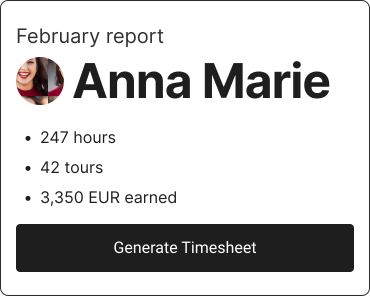
Yes. Time worked per guide is tracked from assigned tours (including prep and cleanup buffers) and feeds both fair-distribution matching and your reporting exports. Timesheets and statements come from the same source of truth: the tours that ran.
Sync bookings, cancellations, and passenger details from Bokun, FareHarbor, Peek, and calendar feeds in real time.
Learn moreMatch every departure with a qualified, available guide using language, skill, and fairness-aware matching.
Learn moreAn AI copilot in your ops chat that finds offers, checks guide eligibility, and executes changes with your approval.
Learn moreUse GuideScout to match with the best guide for your tour.